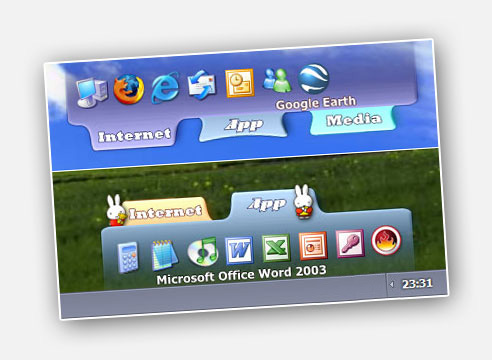
sTabLauncher: This tool helps finding and launching your favorite programs,
web pages, folders, or any type of files in a fast and easy
way. Taking up fewer resources as possible, and allowing you
to personalize the appearance in many ways, by changing
colors, images, transparency, animations, and many other
options to make it blend in with your desktop.
 
         
    If you are looking for the MAC version click here.  
         
    Forum:

http://stablauncher.forumer.com/ more information here
please drop by and leave us a post, thanks!


Version: 2.2.2  
    Release Date: 2010-06-21  
    Languages: Chinese, English, French, German, Italian, Japanese, Lithuanian,
Netherlands, Portuguese, Russian, Spanish, Turkish


Download:

sTabLauncher Setup Full installation
sTabLauncher Setup Mirror

 
      Microsoft .NET Framework 2.0 can be downloaded here  
         
    New Options : - Show on top os fullScreen application (YES/NO)
  By default it's set to false. This will cause sTabLauncher to hide when
  an application is running in fullscreen mode.
 
 
      - Configuration file on the Application's directory
   By default it's false. If set to true, the configuration file will be on the
   same directory as the sTabLauncher.exe. This can be handy if you want
   to keep sTabLauncher on a memory stick, or if you want multiple
   instances running at the same time with diferent configurations.


    Changes :


- Back to .NET 2.0
   Why? Simply because .NET 2.0 is lighter on resources than 3.5.


      - Option to install Babylon 8
   This update includes Babylon 8 which is in my opinion the best translator
   ever. Just press CTRL and click on any word on the screen to instantly
   get the translation. Try it, you wont regreat it.


Version: 2.2.1  
    Release Date: 2009-12-24  
    Languages: Chinese, English, French, German, Italian, Japanese, Lithuanian,
Netherlands, Portuguese, Russian, Spanish, Turkish


Download:

sTabLauncher Setup Full installation
sTabLauncher Setup Mirror

sTabLauncher Files requires .NET Framework 3.5 Installed
sTabLauncher Files Mirror

 
      Microsoft .NET Framework 3.5 can be downloaded here  
         
    What's new : - Open only under the tabs
  When the Hide Completely option is enabled, is now possible to
  chose to open sTabLauncher from anywhere at the edge of the
  screen, or just under the tabs place
 
      - Updated Radio Stations
   The default radio stations on the music tab are now updated
   and working correctly


    Bug fixes :


- Hibernate Problem Fixed
   Now sTabLauncher should be visible and working when restoring
   from a system hibernate


Version: 2.2  
    Release Date: 2009-02-15  
    Languages: Chinese, English, French, German, Italian, Japanese, Lithuanian,
Netherlands, Portuguese, Russian, Spanish, Turkish


Download:

sTabLauncher Setup Full installation
sTabLauncher Setup Mirror

sTabLauncher Files requires .NET Framework 2.0 Installed
sTabLauncher Files Mirror

 
      Microsoft .NET Framework 2.0 can be downloaded here  
         
    What's new : - Text on Icons
  Same as the text on the separators on previous versions
  but now it can be added to any application
 
      - Force Position
   If Force Position is activated sTabLauncher will always be on the
   correct position even if the windows resolution is changed
 
      - Resize window by dragging
   If a tab is dragged to the right it will force the window to grow


    Bug fixes :


- Get web page's icon
  Wasn't getting the correct icon from some web sites


Version: 2.1.1  
    Release Date: 2009-01-20  
    Languages: Chinese, English, French, German, Italian, Japanese, Lithuanian,
Netherlands, Portuguese, Russian, Spanish, Turkish


Download:

sTabLauncher Setup Full installation
sTabLauncher Setup Mirror

sTabLauncher Files requires .NET Framework 2.0 Installed
sTabLauncher Files Mirror

 
      Microsoft .NET Framework 2.0 can be downloaded here  
         
    New Features : - Multiple Monitor Drag sTabLauncher  to any monitor
 
      - Get web page's icon When dragging links from a browser
 
      - Chinese languase added I'm sorry Alzzl for taking so long time
 
      - Lithuanian language added Sorry Valentinas for the delay


    Bug fixes :


- Dragging an icon from a tab to the options
  Now you can safely drag an application icon from any tab to the
  options menu. In case you want to copy the icon from one app
  to another
 
      - Fixed some issues with the hide completely option
   In same cases sTabLauncher wouldn't open again if it was completely
   hidden. Please let me know if this problem persists


Version: 2.1.0.5  
    Release Date: 2007-04-30  
    Languages: English, French, German, Italian, Japanese, Netherlands,
Portuguese, Russian, Spanish, Turkish


Download:

sTabLauncher Setup Full installation
sTabLauncher Setup Mirror

sTabLauncher Files requires .NET Framework 2.0 Installed
sTabLauncher Files Mirror

 
      Microsoft .NET Framework 2.0 can be downloaded here  
         
    Key Features : - Multi-language still not complete, at the moment it's being translated  
      - Configurable separators can change image and add text  
      - User friendlier options menu with many new configuration options  
      - Keyboard control TAB and ARROW keys to select;  
     
ENTER and F keys to execute; ESC to close
 
      - Support for Playlist files Only .PLS (.M3U will be supported soon)  
     
Try adding radio from this site http://www.shoutcast.com/
to a player Tab
 
      - MiniBrowser Add a folder, and select the option Browse Folder,
   then click on it
 
      - Draggable Tabs Try adjusting the tab's position by dragging them
   
 
      - Open With Drag and drop files over an application to open them
   with this application
 
      - Tab Icon Support for more file types with drag and drop
   (*.PNG;*.BMP;*.JPG;*.GIF;*.ICO;*.EXE;*.DLL)


referenced by 


           Reviews on SoftSea  
            Get it from CNET Download.com!        
            Rated by 5 points award on download ready             
         
   
powered by